
AI Book Cover Generator: Captivating Children's Design Ideas & Guide
The magical world of children's books begins with an enchanting cover. It's the first promise of adventure, friendship, and wonder. For authors without design expertise or a big budget, creating a visually appealing and age-appropriate cover can be a daunting challenge. So, how do you create a book cover that captures a child's imagination? This guide will show you how our AI book cover generator empowers you to craft captivating covers effortlessly, combining timeless design principles with cutting-edge innovation. With the right tool, you can bring your story to life before the first page is even turned.
Understanding Unique Children's Book Cover Design Principles
Before diving into creation, it's essential to understand what makes a children's book cover successful. Unlike adult fiction, these covers must communicate joy, safety, and excitement to both kids and the parents who buy the books. They follow a unique set of rules centered on clarity, emotion, and visual delight. A great cover feels like a warm invitation to a world of fun and learning. By mastering these fundamentals, you can guide an AI tool to produce something truly special.
The Psychology of Color for Young Audiences
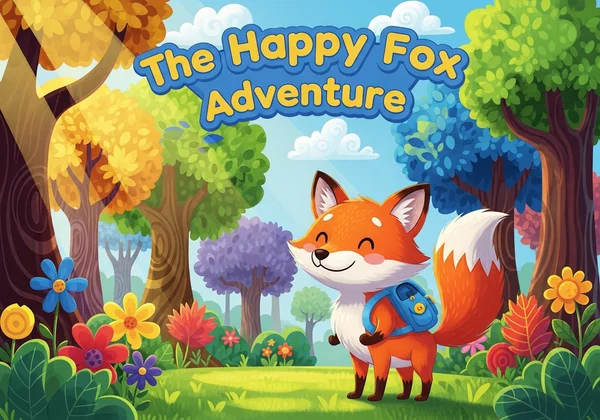
Color is the first thing a child notices. Using bold colors is non-negotiable in this genre. Bright, saturated hues like sunny yellows, vibrant reds, and sky blues evoke feelings of happiness and energy. A cheerful palette instantly signals that the book is fun and engaging. Consider the mood of your story: a gentle pastel theme might suit a lullaby book, while a story about superheroes calls for a dynamic, primary color scheme. The AI cover generator can help you explore countless color combinations until you find the perfect one for your tale.
Bringing Characters to Life on Your Cover
For most children's stories, the main character is the heart of the narrative. A strong character focus on the cover creates an immediate connection with the reader. The character's expression should be clear and emotionally resonant—are they curious, joyful, mischievous, or brave? This visual cue tells children what to expect from their new potential friend. When you're designing, think about placing your protagonist front and center, making eye contact with the reader to forge that instant bond.
Clear Typography for Little Eyes: Readability Matters
The title of your book needs to be perfectly legible. This is where clear typography comes into play. Ornate, complex fonts that might work for adult fantasy will only confuse a young reader. Opt for rounded, friendly, and bold typefaces that are easy to decipher. The font should complement the illustration style without overpowering it. Remember, readability is paramount. The goal is for a child to easily recognize and remember your book's title, making it a favorite they can ask for by name.
Generating Creative Kids Book Cover Ideas with AI
Now that you understand the core principles, let's explore how to apply them using an AI tool. This is where the magic happens. Instead of struggling with complex design software, you can act as the creative director, guiding the AI to generate stunning visuals that align with your vision. It's a partnership between your imagination and the tool's powerful capabilities. The AI book cover design tool makes this process intuitive and exciting.
Crafting Effective Prompts for Engaging Picture Book Covers
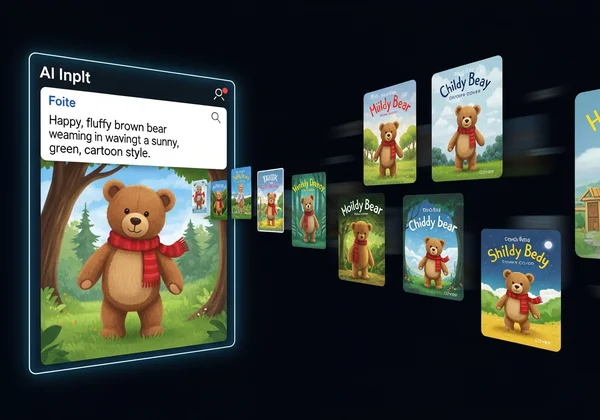
The key to a great AI-generated cover is a great prompt. Be descriptive and specific. Instead of just "a cute bear," try "a happy, fluffy brown teddy bear wearing a red scarf, waving, in a sunny, green forest, cartoon style." Include details about:
- The Subject: Who or what is the focus?
- The Action: What is the subject doing?
- The Setting: Where does the scene take place?
- The Style: Do you want a watercolor look, a simple cartoon, or a detailed illustration?
- The Mood: Use words like "cheerful," "magical," "adventurous," or "cozy."
A well-crafted prompt is the blueprint for your perfect cover.
Exploring Style Templates for Children's Genres
Not sure where to start? A great AI tool provides a library of design styles to kickstart your creativity. Using our AI book cover generator, you can explore templates like "Illustration and Pop Art" or "Minimalist Elegance" and adapt them for a younger audience. These styles provide a professional foundation, which you can then customize with your specific characters and scenes. This approach saves time and ensures your final design has a polished, market-aware feel. Why not explore styles and see what inspires you?
Iterating and Refining Your AI-Generated Children's Cover Designs
Your first generation might not be perfect, and that's part of the creative process. The beauty of using AI is the ability to iterate quickly. Don't like the background? Change the prompt. Want the character to look happier? Add "smiling" to your description. You can generate multiple variations in minutes, a task that would take a human designer hours. This flexibility allows you to refine your cover until it perfectly matches the story within, ensuring every detail is just right.
Essential Elements for a Bestselling Children's Book Cover
A beautiful front cover is just the beginning. To create a professional product that's ready for market, you need to consider the entire package. From the spine that peeks out from a bookshelf to the technical files needed for printing, these final touches transform your design into a tangible, sellable book. Paying attention to these details signals quality and professionalism to parents, librarians, and booksellers.
Beyond the Front: Spine and Back Cover Design Tips
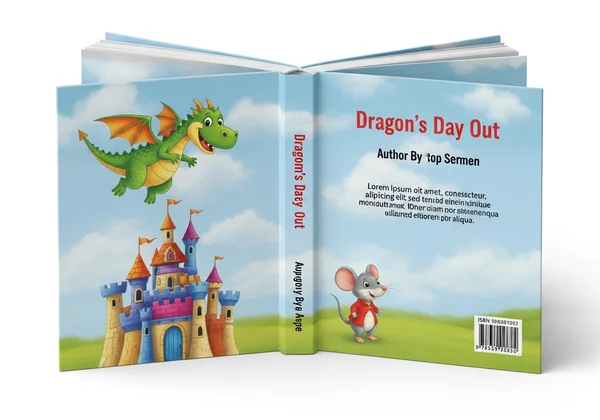
While the front cover grabs attention, the spine and back cover are crucial for book marketing. The spine needs a clear, legible title and author name. The back cover is your sales pitch. It should include a captivating blurb, perhaps a small, charming illustration of a secondary character, and your ISBN barcode. A cohesive design that wraps around the entire book creates a professional and appealing object that children will be proud to own.
Ensuring Print-Ready Quality for Your Children's Book Cover
Nothing is more disappointing than a beautiful design that prints poorly. It's vital to have high-resolution outputs for your files. Platforms like Amazon KDP have specific requirements for cover dimensions and resolution (typically 300 DPI). A reliable AI tool like BookCoverDesign.ai allows you to select your desired cover size, such as for Kindle or print, and download files that are perfectly optimized for professional printing, ensuring your colors are vibrant and your lines are crisp.
Unlock the Magic: Your Path to a Perfect Children's Book Cover
Creating a memorable children's book cover is no longer an insurmountable hurdle. By combining classic design principles with the speed and creativity of an AI book cover generator, any author can produce a professional, engaging, and market-ready cover. You understand the importance of color, character, and clarity. Now, you have the power to bring those elements to life.
Are you ready to stop dreaming and start designing? Your next bestseller deserves a cover as magical as the story it holds. Visit BookCoverDesign.ai to instantly generate the perfect cover for your children's book and share your world with young readers everywhere.
Frequently Asked Questions About Children's Book Cover Design
How can I design a children's book cover that truly stands out?
To stand out, focus on a unique character with an expressive face and use a bold, unconventional color palette. Ensure your title typography is large, clear, and integrated into the artwork. An AI tool can help you rapidly experiment with dozens of unique compositions to find one that is truly eye-catching.
What are the key elements that make a good children's book cover design?
The three most critical elements are an engaging and relatable main character, a bright and emotionally resonant color scheme, and an easy-to-read title. The cover should clearly communicate the book's tone—whether it's funny, adventurous, or quiet—in a single glance.
Can an AI book cover generator create age-appropriate covers for different children's age groups?
Yes. By adjusting your prompts, you can guide the AI to create designs suitable for various age groups. For toddlers, you might request simple shapes and primary colors. For middle-grade readers, you can prompt for more complex illustrations and dynamic scenes. The free AI tool is versatile enough to cater to your specific audience.
What is the optimal resolution for printing children's book covers?
For professional printing, your cover file should always be at least 300 DPI (dots per inch). This ensures that the images and text are sharp and clear, without any pixelation or blurriness. When you download from the platform, you receive high-resolution files ready for both digital and print publication.