
AI Full Wrap Book Cover Design: Print-Ready Spines & Backs
Designing a cover for your ebook is one challenge. But what about the physical, printed version? Creating a professional full wrap book cover—with its front, spine, and back—can feel incredibly complex. You have to worry about precise dimensions, bleed, trim lines, and centering the spine text perfectly. So, how do you create a print cover that looks amazing on the shelf and online?
Many authors get stuck here. The technical requirements are overwhelming, and hiring a designer for a full print layout is expensive. Luckily, there's a simpler, smarter way. AI now makes it possible for anyone to produce a flawless, print-ready cover.
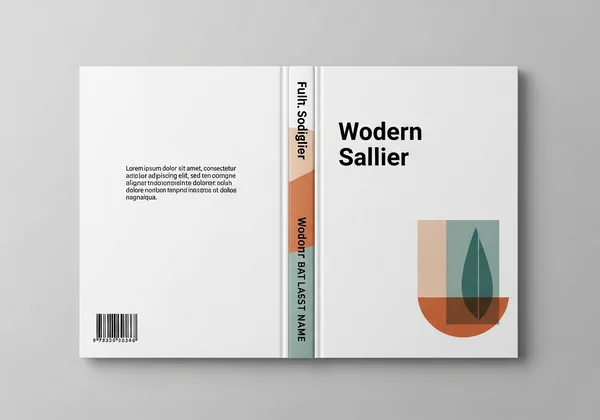
Let’s dive into full wrap book cover design—no overwhelming specs required. We’ll break down the essentials, simplify the technical print terms, and show you how AI handles the hard work. With the right tool, you can design your cover confidently in minutes.
Understanding Full Wrap Book Cover Design Essentials
Before you can create a great print cover, you need to understand its basic structure and the language of printing. A full wrap cover is more than just a front image; it’s a single, continuous file that wraps around your entire physical book.
Deconstructing the Full Wrap: Front, Spine, and Back Cover Anatomy
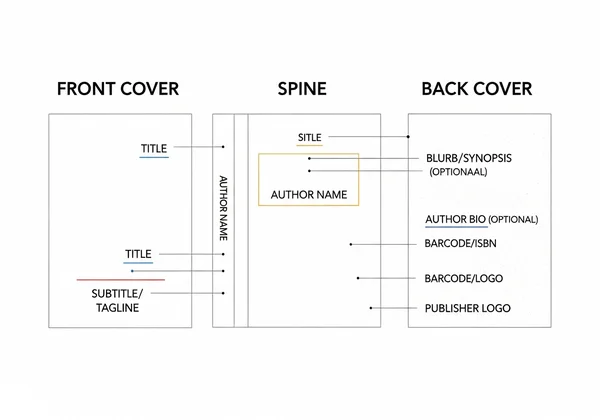
A full wrap cover is made of three distinct but connected parts. Each one serves a unique purpose in attracting and informing potential readers.
-
The Front Cover: This is your book's first impression. Its job is to grab attention, convey the genre and tone, and make someone want to pick it up. It includes the book title, author name, and the primary cover art.
-
The Spine: When your book is on a bookstore or library shelf, the spine is all that’s visible. A well-designed spine must be readable from a distance. It typically features the book title and the author's name, and sometimes the publisher's logo.
-
The Back Cover: Once a reader picks up your book, they almost always flip it over. The back cover is your sales pitch. It needs a compelling book description (blurb), a short author bio, testimonials, and a designated space for the ISBN and barcode.
Mastering Print Specifications: Bleed, Trim, and Safety Margins for KDP
This is where many creators get intimidated, but the concepts are straightforward. Platforms like Amazon KDP (Kindle Direct Publishing) have strict requirements to ensure your cover prints correctly.
- Trim Line: This is the edge where the book will be physically cut. Anything outside this line will be trimmed off.
- Bleed: Your cover’s background color or image must extend beyond the trim line. This extra area is called the "bleed." It ensures that after the page is trimmed, there are no unprinted white edges. Usually, this is about 0.125 inches (3 mm) on all sides.
- Safety Margin: This is an area just inside the trim line. All important text and images (like the title or author's name) should be kept within this margin. This prevents anything crucial from being accidentally cut off during the printing process.
Getting these dimensions right is critical for a professional result. It’s also one of the biggest benefits of using an AI tool that calculates them for you.
Leveraging AI for Seamless Print Book Cover Creation
Manually creating a full wrap cover in Photoshop demands precise math and print templates. AI tools fix that. They automate the tech so you can focus on creativity.
How Our AI Book Cover Generator Transforms Full Wrap Design Complexity
Forget template struggles. Our AI tool offers a streamlined, intelligent solution that gets print specs right. It auto-calculates spine width from your page count and paper. Plus, it builds in bleed and safety margins from the start.
This means you no longer need to guess or perform complicated math. The AI acts as your personal designer, handling the technical setup behind the scenes. This saves hours of work and frustration, allowing you to generate multiple professional concepts in minutes. You get a market-aware, print-ready design without needing any graphic design skills.
Step-by-Step: Inputting Your Book Details & Print Dimensions
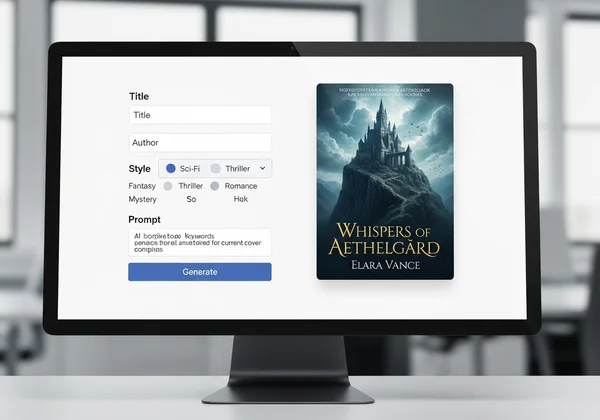
Creating your cover is a simple, intuitive process. The platform guides you through a few key steps to provide the AI with all the information it needs.
- Enter Your Book Title and Author Name: This is the core text for your front cover and spine.
- Choose a Cover Style: Select from a library of genre-specific styles, such as "Minimalist Elegance" or "Illustration and Pop Art," to set the right tone.
- Select Cover Dimensions: Choose your desired print size, like the popular 6x9 inch format for paperbacks.
- Provide Your Prompt: This is where your creativity comes in. Describe the imagery, mood, colors, and key elements you want to see on your cover. The more detailed you are, the better the AI can match your vision.
Once you’ve provided these details, you can start generating your design. The AI will produce a complete full wrap cover ready for review.
Crafting Impactful Book Spines and Engaging Back Covers with AI
A great front cover gets your book noticed, but the spine and back cover are what often seal the deal. AI can help you design these elements to be just as effective as your front cover.
Designing an Eye-Catching Book Spine: Titles, Author Names, and Branding
The book spine is crucial for shelf appeal. Its main goal is readability. The text must be clear, legible, and large enough to be seen from a distance. When using an AI tool, you can ensure the font and color choices on the spine are consistent with the branding of the front cover.
The AI automatically centers the title and author name on the calculated spine width, a task that can be tricky to do manually. This ensures a professional alignment that looks clean and polished on the finished product.
Developing a Compelling Back Cover: Blurbs, Author Bios, and ISBN Placement
The back cover is your most important piece of marketing material. It should be clean, easy to read, and persuasive. An effective back cover typically includes:
- A Gripping Blurb: A short, compelling summary that hooks the reader without giving away the ending.
- An Author Bio: A brief paragraph about the author to build a connection with the reader.
- Testimonials or Review Snippets: Social proof can be very powerful.
- ISBN Barcode: A designated white box for the barcode, usually in the bottom right corner.
AI design tools can generate layouts that elegantly incorporate these elements. They create a visual hierarchy that guides the reader's eye from the blurb to the author bio, all while leaving the necessary space for the ISBN.
Finalizing Your AI-Generated Print-Ready Full Wrap Cover
After the AI generates your design, the final steps are to review the output and download the file for printing. This stage ensures your cover is perfect before it goes to press.
Reviewing AI Outputs for Consistency and Professionalism
Take a moment to look over the complete full wrap design. Check for consistency in color, font, and style across the front, spine, and back. Make sure all the text is correct and easy to read.
Even though the AI handles the technical margins, it's always good practice to do a final visual check. Confirm that no critical text is too close to the edges. This quick review ensures the final product is professional and error-free. If you need any changes, you can easily tweak your prompt and generate a new version.
Downloading High-Resolution Files for Publishers & Self-Publishing Platforms
Once you are happy with your design, the final step is to download it. Our AI tool provides high-resolution output files (like PDF or PNG) at 300 DPI, the standard for professional printing.

These files match specs for Amazon KDP, IngramSpark, and Barnes & Noble Press. Just upload. Bleed, trim, and resolution are all handled. You can get your print-ready file and move forward with publishing.
Your Professional Print Cover Awaits: Design with Confidence Using AI
Creating a full wrap book cover no longer has to be a source of stress. AI makes it simple, fast, and affordable to produce a cover that rivals those from traditional publishing houses. By automating complex calculations and offering limitless creative possibilities, AI empowers you to bring your vision to life.
Ditch the template headaches and sky-high fees. Jump in and craft a standout cover that turns heads on any shelf.
Ready to bring your book to life? Create your perfect book cover today and design with confidence.
The Takeaway
How do I design a full wrap book cover for print?
The easiest way is to use an AI-powered tool. Simply input your book's details, like title, page count, and trim size, and describe your visual ideas. The AI will automatically generate a complete, print-ready file that includes the front, spine, and back cover with all the correct technical specifications like bleed and margins.
What are the key elements of a professional full wrap cover?
A professional full wrap cover includes a visually striking front cover with a clear title, a readable spine with the title and author name, and an engaging back cover with a compelling blurb, author bio, and space for an ISBN barcode. All three parts should have a consistent design and color scheme.
Can AI truly generate print-ready full wrap book covers?
Yes, absolutely. Advanced platforms like our AI generator are specifically designed to produce high-resolution (300 DPI) files that meet the strict standards of print-on-demand services like Amazon KDP. The AI automatically calculates spine width and adds the necessary bleed, ensuring your file is ready for upload without any technical adjustments. You can try the AI generator to see the quality for yourself.
How do I ensure my book spine text is readable?
To ensure readability, use a clear, simple font that contrasts well with the spine's background color. The font size should be large enough to be easily read from a shelf. AI tools help by suggesting complementary fonts from your front cover design and perfectly centering the text on the spine.
What are the essential print specifications for a full wrap cover?
The most critical specifications are trim size (the final dimensions of the book), bleed (an extra margin of the background image that gets trimmed off), and the safety margin (the inner area where all text must be placed to avoid being cut). You also need a high-resolution file, typically 300 DPI (dots per inch).